Showing posts with label elementary. Show all posts

Monday, December 14, 2020

What is Immersive Reader?

You may have heard of Immersive Reader, but if you haven't (or just want to learn a bit more) I got you! It's basically a tool that helps to improve reading comprehension. It's great for new readers, language learner (not just English language learners) and anyone with learning differences such a dyslexia. The best thing is that it works in so many programs! If you want to see some examples of program, this short video goes through many of them.

So let's take a look at some of the things it can do. 


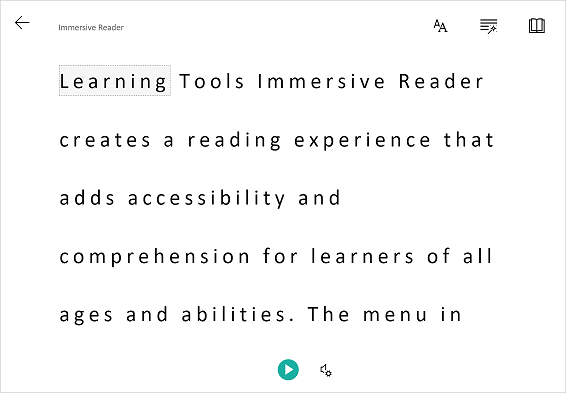
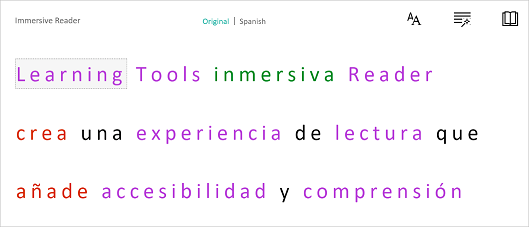
One thing it can do is to isolate content to improve readability.  This can be by highlighting a specific word or only showing a line or two to help focus. 


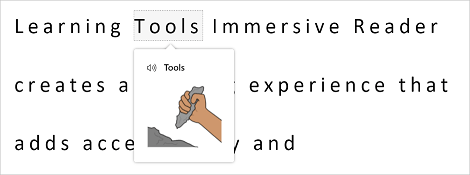
If you click on a word you can use the picture dictionary to see a graphical representation of the word as well as hear the word spoken. 


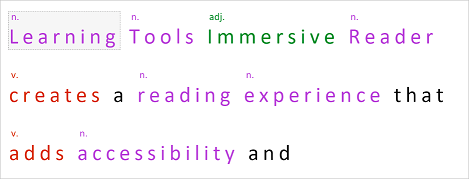
It can also help when learning parts of speech and grammar by highlighting verbs, nouns, pronouns, and more.


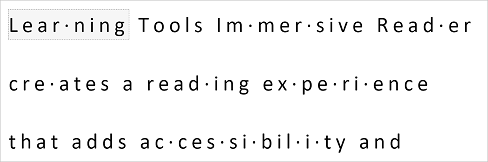
You can break words up into syllables to help new readers sound out words. 


The last thing that I am going to mention is that Immersive Reader can translate text into a wide variety of different languages . The great thing is that all of the above tools also work when the text is translated!


Thursday, February 21, 2019

Free Math and Science Online Textbooks

“I can’t find my textbook!” “I don’t remember getting a textbook.” Does this sound familiar to you? That is what I kept hearing at the end of every year. Then I would have to go through a big hassle of collecting money from student to repurchase the outdated textbooks that I had. I hated having to worry about students losing textbooks or that I was always replacing textbooks that I didn’t even want that included too much information or not enough information. Enter FlexBooks. FlexBooks are online textbooks from a company called CK12. I instantly liked them for many reasons, but the two big ones were that I could customize the book and that it could be posted on my website and downloaded by the students. This video does a great job of explaining how they work. While not every subject has a FlexBook they have a large list of books that include math and science books for elementary, middle and high school along with some other areas such as Writing, Astronomy, History and Engineering.

So, this sounds good you say, but how can I really use it in my classroom? I picked out a textbook that I wanted to use and then went through it to delete the things that don’t apply to my curriculum. I also added in some information that wasn’t there that I wanted to make sure my students had in their book. You can also include links to worksheets (CK12 has a workbook that goes along with most of their textbooks). Once it’s created you can save it as a PDF and post it on a web page or e-mail it to students. Even better, students can put the PDF on their computers, phones, Kindles, IPads, Nooks or other eReader. If you don’t want to customize your book you can find select FlexBooks already in Kindle or Nook/IPad/Android format.

Am I convincing you yet? Maybe you want to make sure you have a teacher’s edition to refer to or a book or worksheets or labs. Well, you got it! The workbooks that are available can also be customized so can you make them fit your classroom. I usually post them on my website and the students can have access to them all the time (no more “I lost it.”)

Looking for more? CK12 has a more interactive way of presenting information that allows you pull short concepts along with chapters into an online interactive “book” Many of the concepts include video clips and interactive quizzes.

Do you use textbooks in your classroom? 

crossposted on by Science Blog - SavvySecondaryScience

Saturday, January 24, 2015

BrainPop meets Primary Sources

Take a look at this post from BrainPop about how they are connecting primary sources to their movies.  Right now about 20 of their videos have primary sources attached to them, but more are being added.  To access the primary sources simply click on the activities icon from the main topic page and then you'll see a tab for primary sources.  Once you are on that page there is a worksheet that you can print out and then a link to the primary source.  If you take a look at the images below you will see the link on the Galileo page to the primary source, which in this case happens to be another quick video to watch.  I think this is a great way to connect subject areas.  Many students associate primary source documents with Social Studies, but now they can see that primary sources are in all subject areas


This post is cross posted on my science teaching blog Savvy Secondary Science

Saturday, December 13, 2014

Bird Brain Science - science meets the common core

BirdBrain Science is a website that allows you to provide your students with common core based science readings that you can differentiated based on their reading level.  Most articles will adjust anywhere from 3rd to 8th grade.  In addition, the students can have the articles read to them.  At the end there is a short quiz.  The quiz questions, types and length, vary depending on what grade level they were assigned.  At the end you can review reports of your students' program.

Below is a short video to explain the site a little more.

Follow this link to participate in a pilot to access this site for free.

What ways do you incorporate reading into your classroom?

This post is cross posted on my other blog Savvy Secondary Science 

Sunday, January 12, 2014

ClassDojo - manage student behavior


I have a particularly bad class this year.  It's just the one period that I have after lunch, but they drive me crazy.  I have starting using ClassDojo because it's an easy way for me to record the behavior in the classroom.  Students and parents have access to these records so they can see how they are behaving.

ClassDojo gives me the option of updating behavior instantaneously using a laptop, tablet, or smartphone and can be displayed via computer, projector, or interactive whiteboard. The availability of data engages students and helps actively shape behavior, thus creating a more positive learning environment in the classroom.

ClassDojo also automatically generates behavior reports that I can send home to parents or share with students. These reports have given parents and students insight into the classroom that hadn’t been previously available. I believe that providing students with feedback has allowed learning to flourish in my classroom, increasing students’ positive behavior and intrinsic motivation.

What do you do to track classroom behavior?

Thursday, August 29, 2013

StudyChamps - worksheets and interactive mini-quizzes

If you are like me, you are always looking for a short worksheet to have for emergency situations or sub plans or for that student who always finishes early.  StudyChamps is a site that has a collection of worksheet and interactive for you to use.  (Besides science, it also has Social Studies, English and Math.)  I would say that this site is aimed mostly for elementary and middle school.  While the interactive are very simple, the nice thing is that the students don't need an account to be able to access them.  Just give the students the link (use a link shortener) and they are good to go!

Where do you look for those "little extras"?