Showing posts with label literacy. Show all posts

Monday, December 27, 2021

Grammarly - an extension for better writing

Grammarly Writing Support
We do so much writing on our computers, as do our students.  I always want to make the best impression when sending an email to parents or an administrator and I hate when I find out I sent something with grammar mistakes.  I've been using Grammarly on my computer and I'm ashamed at the number of mistakes that it catches. I've mentioned it to several students and they have been using it for their writing as well

You can use it in several different programs, but I have been using it as an extension in Chrome and Edge, in Outlook, and in Word. There is also a desktop app, but I haven't quite figured out how to use it and these other ways are easy to use.  It does the basics of finding spelling and grammar mistakes but also points out when something is unclear, when you are being wordy and when you aren't consistent in your tone. 

As with most things, there is both a free and paid version. The paid version is $12 a month, but you don't really need it.  While the program will let you know of the number of additional things that can be fixed with the premium version, the free version does enough for me.  Who doesn't want free right?!

If you use Grammarly, let me know what you like about it and what programs you use it in. 

If you want to see it in action, take a look at the video below.


Monday, August 2, 2021

Enhance your reading with Picture Dictionary

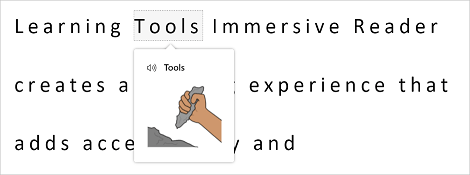
Picture Dictionary is a great addition to Microsoft's Immersive Reader. Immersive Reader is in so many apps and websites, Flipgrid, Wonderopolis, Buncee, Wakelet, ThingLink, and Nearpod just to name a few. I especially like this for English Language Learners. When learning English reading (or trying to read) a definition might not be sufficient. They say a picture is worth a thousand words and this is one situation in which I would say this is true.

When Immersive Reader mode is one, one can click on a word and a picture pops up.  


Leave a comment and let me know how you would use this in your classroom.

Monday, December 14, 2020

What is Immersive Reader?

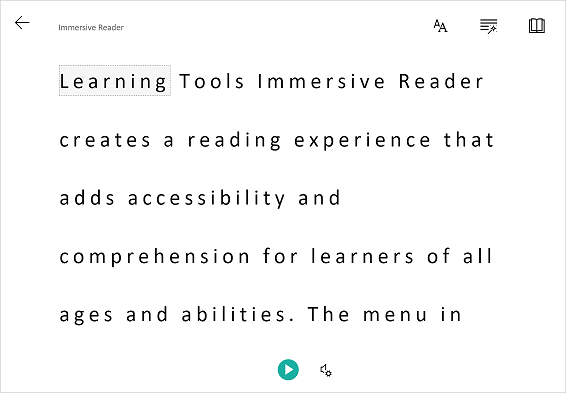
You may have heard of Immersive Reader, but if you haven't (or just want to learn a bit more) I got you! It's basically a tool that helps to improve reading comprehension. It's great for new readers, language learner (not just English language learners) and anyone with learning differences such a dyslexia. The best thing is that it works in so many programs! If you want to see some examples of program, this short video goes through many of them.

So let's take a look at some of the things it can do. 


One thing it can do is to isolate content to improve readability.  This can be by highlighting a specific word or only showing a line or two to help focus. 


If you click on a word you can use the picture dictionary to see a graphical representation of the word as well as hear the word spoken. 


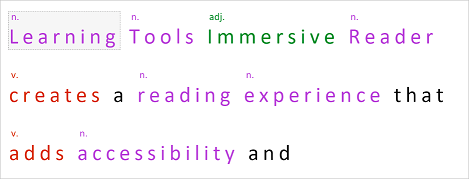
It can also help when learning parts of speech and grammar by highlighting verbs, nouns, pronouns, and more.


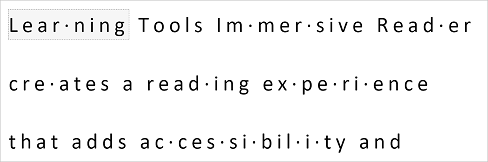
You can break words up into syllables to help new readers sound out words. 


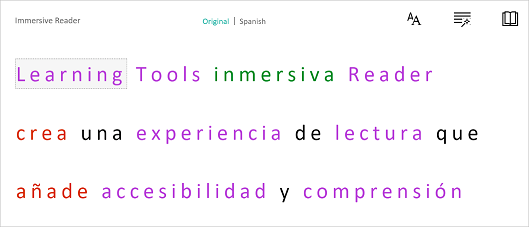
The last thing that I am going to mention is that Immersive Reader can translate text into a wide variety of different languages . The great thing is that all of the above tools also work when the text is translated!


Monday, January 21, 2019

Turning Google Docs Footnotes into Endnotes


In my schoolwe don't ask the students to use footnotes.  Rather we have students do a works cited page at the end of their document.  If you are school that uses Google then you might be familiar with the autocitation feature of Google Docs.  This is really helpful for students, but the problem is that it creates footnotes, not endnotes.  In the past, I have had my students copy the footnotes and paste them at the end of their paper.  While not terrible, students often forget or don't capture the whole citation.  I recently came across a Google Doc add-in called Endnote Generator and I think it's just what my students need.  Is this something that you think you would use with your students?  Do you know of something similar?

Wednesday, January 24, 2018

Quickly Summarize a Passage of Text

SummarizeThis is a website that will summarize the main point(s) of articles and passages.  All you need to do is to paste in a block of text and a summary will be generated.  This can be helpful when students are doing a research paper and want to know if a specific article will be relevant.  It can be a great time saver so that you don't have to read a long passage only to find that it's not relevant to what you need.


Monday, July 24, 2017

Books for students with visual impairments and physical disabilities

Bookshare is a website that provides students with a visual impairment or physical disability access to a large library of reading materials. There are over 500,000 books available. These books can be listened to or read directly from the browser. Audio versions of the books can be accompanied by printed words that are highlighted as they are spoken or with digital braille. Students and schools can qualify to have access to these books for free.

This video gives an overview of the website and what it can offer.


Saturday, December 13, 2014

Bird Brain Science - science meets the common core

BirdBrain Science is a website that allows you to provide your students with common core based science readings that you can differentiated based on their reading level.  Most articles will adjust anywhere from 3rd to 8th grade.  In addition, the students can have the articles read to them.  At the end there is a short quiz.  The quiz questions, types and length, vary depending on what grade level they were assigned.  At the end you can review reports of your students' program.

Below is a short video to explain the site a little more.

Follow this link to participate in a pilot to access this site for free.

What ways do you incorporate reading into your classroom?

This post is cross posted on my other blog Savvy Secondary Science 

Saturday, January 18, 2014

ReadWorks - reading meets science (and other subjects)

I was looking for some short readings to use with my 8th grade Earth Science class as I wanted them to have something short to do in the beginning of the period.  Our superintendent is really pushing literacy so I thought it would be a good idea.  In my search for short readings with questions along with them I came across ReadWorks.  It's a free research-based reading comprehension curriculum.  Don't get scared off by me saying curriculum.  I just take the pieces that I need and ignore the rest (I mean I am first and foremost a science teacher!)
 
Where do you find science readings for your class?

Monday, January 13, 2014

Creating an easy Works Cited Page

If your school is anything like mine the Common Core wave is just being dumped onto you.  Along with that comes a lot of writing.  If you are having students do research then you might be asking them to submit a Works Cited page.  Here are 3 sites that easily allow your students to create these pages.
  1. EasyBib - this sites allows you to just type in the name of a book or enter a website address and gives you MLA citation (other versions are also available, but not on the free site).
  2. Citation Machine - this site is a little less robust than the last.  It is really only good for citing books, but gives you the option of using MLA or APA citations.
  3. BibMe - this one is my favorite because it is the most robust.  It gives you the option to cite just about anything that you need, plus you have the options to use MLA, APA or Chicago formats.
If you are also concerned about plagiarism take a look at this site to help with that.

What does the common core look like in your classroom?